# Linux Structure
Linux and Windows have different ways of organizing their file systems. In Linux, everything starts from a single root directory `/`, while Windows begins with separate drives like `C:\` or `D:\`. This means that in Linux, all files and directories are part of one large tree-like structure, whereas Windows treats each drive as an independent storage space.
System and program files are also organized differently. In Linux, system configuration files are typically stored in `/etc/`, while executable programs are found in directories like `/bin/`, `/usr/bin/`, and `/sbin/`. In Windows, system files are mainly located in `C:\Windows\`, and programs are installed in `C:\Program Files\` or `C:\Program Files (x86)\` for 32-bit applications.
User data also follows distinct structures. Linux stores user-specific files in `/home/username/` (in our case it’s ‘`kali`’), where documents, downloads, and configurations are neatly placed. Windows, on the other hand, stores user files in `C:\Users\Username\`, with subdirectories like `Documents`, `Downloads`, and `Desktop`.
Another key difference is how devices and hardware are managed. In Linux, devices such as hard drives, USBs, and even the keyboard are treated as files, typically found in `/dev/`. In Windows, devices are managed through a dedicated device manager, and drives appear under This PC with assigned letters like `C:` or `D:`.
Overall, Linux follows a more unified and modular structure where everything is treated as a file, while Windows relies on a drive-based, graphical approach that separates system components, applications, and user data.
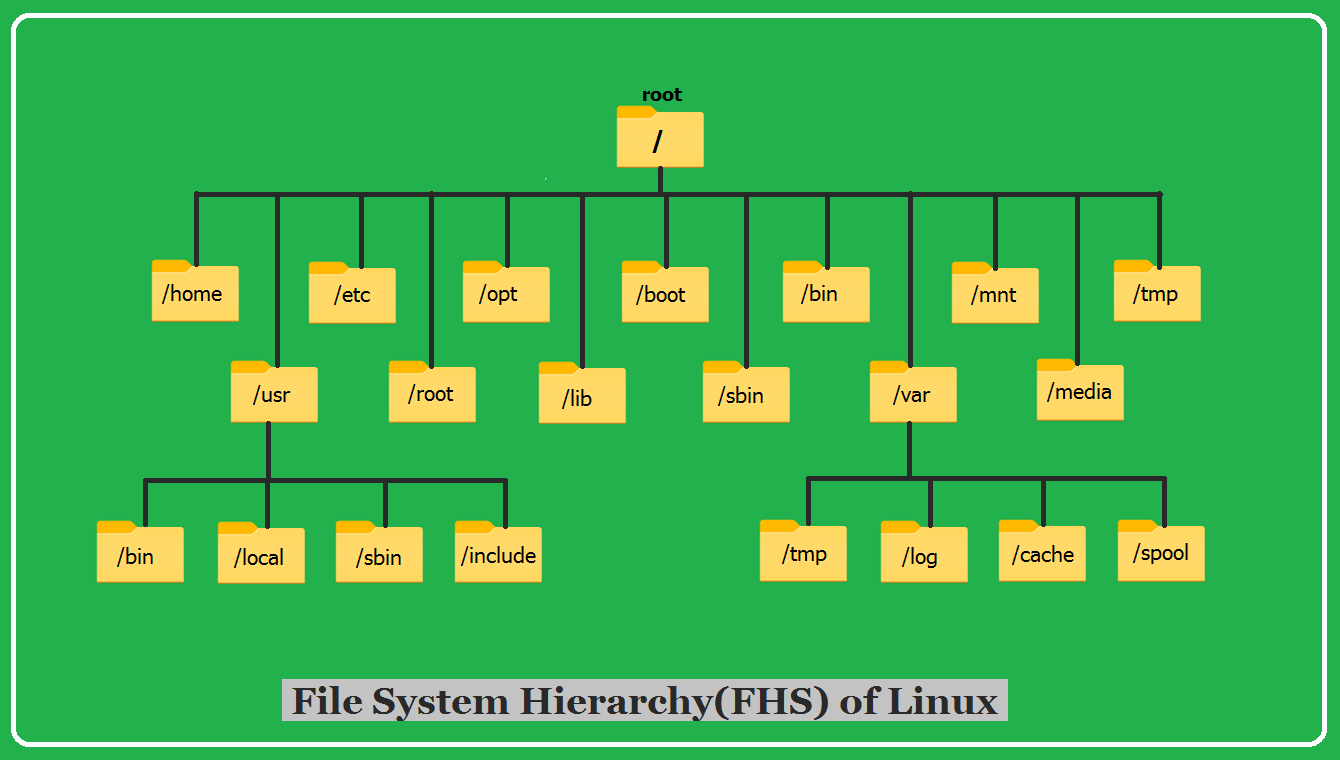
The following image shows how the directory structure or file system of Linux is organized in a tree-like structure:
The following table explains a few important directories and their uses in Linux. This is just an overview—you'll learn more about additional directories and their purposes as you gain hands-on experience with Linux.
| Directory | Purpose |
| ----------------- | ---------------------------------------------------------------------------------- |
| `/` | Root directory. The top-level of the system. Everything starts from here. |
| `/bin` | Essential system programs (e.g., `ls`, `cp`, `mv`). Used by all users. |
| `/sbin` | System administration programs (e.g., `iptables`, `reboot`). Mostly for root user. |
| `/usr/bin` | Extra programs installed (e.g., `nmap`, `hydra`). Regular users can use them. |
| `/usr/sbin` | Extra system admin tools (e.g., `apache2`, `mysql`). Mostly for root user. |
| `/etc` | Configuration files for the system and applications (e.g., `passwd`, `shadow`). |
| `/home` | Personal files for each user (e.g., `/home/user/`). |
| `/root` | Home directory of the root (admin) user. |
| `/tmp` | Temporary files. Deleted automatically after reboot. |
| `/var` | Stores logs, cache, and databases (e.g., `/var/log`, `/var/lib`). |
| `/opt` | Third-party software (e.g., extra tools like Burp Suite). |
| `/boot` | Boot files like the Linux kernel and GRUB bootloader. |
| `/dev` | Contains device files (e.g., `sda` for hard drives, `tty` for terminals). |
| `/mnt` | Mount point for external drives (e.g., USB, network drives). |
| `/media` | Auto-mounting for USB and CD/DVD drives. |
| `/proc` | Virtual system info files (e.g., CPU, memory usage). |
| `/sys` | Another virtual system folder. Used by the kernel to manage hardware. |
| `/lib` & `/lib64` | System libraries needed for running programs. |
---
# Agent Instructions: Querying This Documentation
If you need additional information that is not directly available in this page, you can query the documentation dynamically by asking a question.
Perform an HTTP GET request on the current page URL with the `ask` query parameter:
```
GET https://handbook.ncateam.xyz/fundamentals/linux/linux-structure.md?ask=
```
The question should be specific, self-contained, and written in natural language.
The response will contain a direct answer to the question and relevant excerpts and sources from the documentation.
Use this mechanism when the answer is not explicitly present in the current page, you need clarification or additional context, or you want to retrieve related documentation sections.