# IP Addressing & Subnetting
Networking is the backbone of everything digital, and as a pentester, understanding how devices communicate is crucial. This chapter will break down IP addressing, subnetting, MAC addresses, and how they all tie together to form the networks we hack, secure, and navigate daily.
## IPv4 & IPv6 Basics
Every device connected to a network needs an address, just like houses need addresses for mail delivery. That’s where **IP addresses** (Internet Protocol addresses) come in. They help identify and locate devices on a network.
### IPv4: The Classic Workhorse
IPv4 (Internet Protocol version 4) has been around since the early days of the internet. It uses a **32-bit address scheme**, which means there are about **4.3 billion** unique IPs available. While this seemed like a lot back in the day, the explosion of internet-connected devices quickly started running us out of addresses.
Example of an IPv4 address:
```
192.168.1.1
```
It consists of **four octets** (numbers between 0-255), separated by dots.
### IPv6: The Future (That’s Already Here... Kinda)
IPv6 was created to solve the IPv4 shortage. It uses a **128-bit** address, offering a mind-blowing **340 undecillion** possible addresses (a number so large it’s basically infinite for our purposes).
Example of an IPv6 address:
```
2001:0db8:85a3:0000:0000:8a2e:0370:7334
```
But if IPv6 is so much better, why do we still use IPv4? Well, IPv6 adoption has been **slow** because most legacy systems still rely on IPv4, and many companies hesitate to upgrade due to cost and complexity. As a pentester, you’ll mostly deal with IPv4, but knowing IPv6 is important as its usage grows.
## MAC Addresses & ARP: Why Have Two Addresses?
If an IP address is like a street address, a **MAC address** (Media Access Control address) is like a unique serial number assigned to every network device (NIC) by its manufacturer. While an IP address can change (like moving to a new house), a MAC address stays the same (like your DNA).
Example MAC Address:
```
00:1A:2B:3C:4D:5E
```
MAC addresses operate at **Layer 2 (Data Link Layer)** of the OSI model, while IP addresses operate at **Layer 3 (Network Layer)**. This is where **ARP (Address Resolution Protocol)** comes in. ARP is responsible for translating IP addresses into MAC addresses. When your computer wants to send data to another device, it first asks, *“Hey, who has this IP? Give me your MAC address!”* The receiving device responds with its MAC, and the communication happens.
This is also where attacks like **ARP spoofing** come into play, which pentesters often exploit to intercept network traffic. ARP Spoofing is out-of-scope of this section but you can research more about this.
## Public vs. Private IPs & NAT (How the Internet Stays Organized)
Not every device can have a unique public IP—there simply aren’t enough to go around (thanks, IPv4). That’s where **private IP addresses** and **NAT (Network Address Translation)** step in.
### Public IPs
These are unique, globally routable (accessable) addresses assigned to devices on the internet. Think of them as your phone number—anyone in the world can call you if they know it.
### Private IPs
These are reserved for use within private networks (homes, offices, etc.) and **cannot be reached directly from the internet**. Common private IP ranges are:
* `192.168.0.0 – 192.168.255.255`
* `10.0.0.0 – 10.255.255.255`
* `172.16.0.0 – 172.31.255.255`
Since private IPs can’t directly communicate with the internet, routers use **NAT** to translate them into public IPs.
### How NAT Works
When a device with a private IP (e.g., `192.168.1.10`) wants to access the internet, the router changes its source IP to the public IP (e.g., `203.0.113.5`). When the response comes back, the router knows which private IP requested it and forwards the data correctly. This also provides a **layer of security**—outside attackers can’t directly reach devices behind NAT unless port forwarding is set up.
{% hint style="info" %}
~~Private~~ Public IP is assigned to router of the home network by Internet Service Providers (ISP).
{% endhint %}
## Subnetting
Subnetting is the process of dividing a large network into smaller, more manageable sections. This helps with efficient IP usage, security, and network performance.
Subnetting According to https://www.calculator.net/
A subnet is a division of an IP network (internet protocol suite), where an IP network is a set of communications protocols used on the Internet and other similar networks. It is commonly known as TCP/IP (Transmission Control Protocol/Internet Protocol).
The act of dividing a network into at least two separate networks is called subnetting, and routers are devices that allow traffic exchange between subnetworks, serving as a physical boundary. IPv4 is the most common network addressing architecture used, though the use of IPv6 has been growing since 2006.
An IP address is comprised of a network number (routing prefix) and a rest field (host identifier). A rest field is an identifier that is specific to a given host or network interface. A routing prefix is often expressed using Classless Inter-Domain Routing (CIDR) notation for both IPv4 and IPv6. CIDR is a method used to create unique identifiers for networks, as well as individual devices. For IPv4, networks can also be characterized using a subnet mask, which is sometimes expressed in dot-decimal notation, as shown in the "Subnet" field in the calculator. All hosts on a subnetwork have the same network prefix, unlike the host identifier, which is a unique local identification. In IPv4, these subnet masks are used to differentiate the network number and host identifier. In IPv6, the network prefix performs a similar function as the subnet mask in IPv4, with the prefix length representing the number of bits in the address.
Prior to the introduction of CIDR, IPv4 network prefixes could be directly obtained from the IP address based on the class (A, B, or C, which vary based on the range of IP addresses they include) of the address and the network mask. Since the introduction of CIDRs, however, assigning an IP address to a network interface requires both an address and its network mask.
Below is a table providing typical subnets for IPv4.
| Prefix size | Network mask | Usable hosts per subnet |
| ------------------ | --------------- | ----------------------- |
| /1 | 128.0.0.0 | 2,147,483,646 |
| /2 | 192.0.0.0 | 1,073,741,822 |
| /3 | 224.0.0.0 | 536,870,910 |
| /4 | 240.0.0.0 | 268,435,454 |
| /5 | 248.0.0.0 | 134,217,726 |
| /6 | 252.0.0.0 | 67,108,862 |
| /7 | 254.0.0.0 | 33,554,430 |
| Class A | | |
| /8 | 255.0.0.0 | 16,777,214 |
| /9 | 255.128.0.0 | 8,388,606 |
| /10 | 255.192.0.0 | 4,194,302 |
| /11 | 255.224.0.0 | 2,097,150 |
| /12 | 255.240.0.0 | 1,048,574 |
| /13 | 255.248.0.0 | 524,286 |
| /14 | 255.252.0.0 | 262,142 |
| /15 | 255.254.0.0 | 131,070 |
| Class B | | |
| /16 | 255.255.0.0 | 65,534 |
| /17 | 255.255.128.0 | 32,766 |
| /18 | 255.255.192.0 | 16,382 |
| /19 | 255.255.224.0 | 8,190 |
| /20 | 255.255.240.0 | 4,094 |
| /21 | 255.255.248.0 | 2,046 |
| /22 | 255.255.252.0 | 1,022 |
| /23 | 255.255.254.0 | 510 |
| Class C | | |
| /24 | 255.255.255.0 | 254 |
| /25 | 255.255.255.128 | 126 |
| /26 | 255.255.255.192 | 62 |
| /27 | 255.255.255.224 | 30 |
| /28 | 255.255.255.240 | 14 |
| /29 | 255.255.255.248 | 6 |
| /30 | 255.255.255.252 | 2 |
| /31 | 255.255.255.254 | 0 |
| /32 | 255.255.255.255 | 0 |
### Subnet Mask
A **subnet mask** defines which part of an IP address is the network portion and which part is for devices (hosts). The most common subnet mask is:
```
255.255.255.0
```
This means:
* The first **three** octets (`192.168.1`) define the network.
* The last octet (0-255) is used for devices.
### More about Subnet
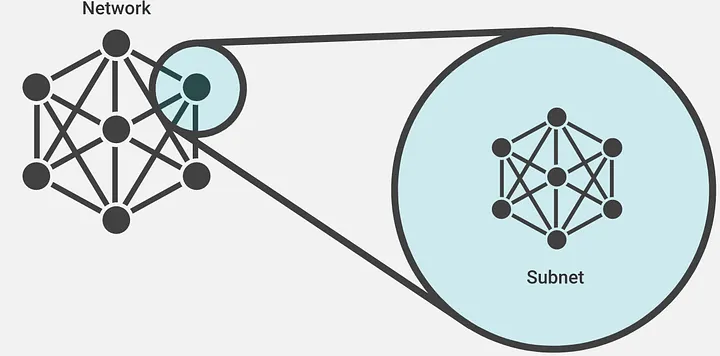
The image above shows a network on the left side of the figure, where each node represents a subnet. If we zoom into one of the nodes, we can see devices, routers, switches, etc., which indicates that we are dividing a large network into smaller groups and merging all subnets to form a complete network. Subnets are commonly used in enterprise environments. For example, in a college, the science block and the management block could each have a different subnet setup.
### Subnetting Example
{% hint style="info" %}
To learn how to manually calculate subnets watch this video: **(RECOMMENDED)**
{% endhint %}
We can use this particular website: (you can use any website of your choice). You can fill the IP address of the network which is `192.168.10.0` in our case. For the Subnet Mask we can select `255.255.255.0` which can also be denoted by prefix size `/24`.
When we click "Calculate" we should get the result as:
From the above image we can conclude that subnetting the main network of IP: `192.168.10.0` with subnet mask `255.255.255.0` gives:
* **IP Address:** `192.168.10.0` → This is the network’s starting address.
* **Network Address:** `192.168.10.0` → The identifier for this subnet; all IPs within belong to the same network.
* **Usable Host IP Range:** `192.168.10.1 - 192.168.10.254` → These are the actual IPs that devices can use.
* **Broadcast Address:** `192.168.10.255` → Used to send data to all devices in the subnet.
* **Total Number of Hosts:** `256` → Includes all possible addresses.
* **Number of Usable Hosts:** `254` → Excludes the network and broadcast addresses.
* **Subnet Mask:** `255.255.255.0` → Defines the size of the subnet.
* **Wildcard Mask:** `0.0.0.255` → Used in firewall rules and ACLs (opposite of subnet mask).
* **Binary Subnet Mask:** `11111111.11111111.11111111.00000000` → Shows how the subnet is divided.
* **IP Class:** `C` → A Class C network means smaller networks with up to 254 usable addresses.
* **CIDR Notation:** `/24` → Shorthand for the subnet mask.
* **IP Type:** `Private` → Cannot be routed directly on the internet.
I showed a generic subnetting of main network. Now let's subnet for a realistic scenerio:
Let’s say XYZ Corp. owns the network `192.168.10.0/24`. They need to divide this network into smaller subnets for different departments:
* **IT Department:** 50 devices
* **HR Department:** 30 devices
* **Sales Team:** 40 devices
To properly subnet the network, we can use a subnet calculator (like the one on [calculator.net](https://www.calculator.net/ip-subnet-calculator.html)).
* **Start with the Main Network (`192.168.10.0/24`)**:
* This network provides 256 IP addresses in total (from `192.168.10.0` to `192.168.10.255`).
* **Allocate Subnets for Each Department**:
* **IT Department (50 devices)**: We need at least 50 usable IP addresses. A **/26 subnet** will provide 62 usable IPs, which is enough.
* Subnet: **`192.168.10.0/26`** (Usable range: `192.168.10.1 - 192.168.10.62`)
* **HR Department (30 devices)**: A **/27 subnet** will provide 30 usable IPs, perfect for HR.
* Subnet: **`192.168.10.64/27`** (Usable range: `192.168.10.65 - 192.168.10.94`)
* **Sales Team (40 devices)**: A **/26 subnet** is also enough for the sales team.
* Subnet: **`192.168.10.96/26`** (Usable range: `192.168.10.97 - 192.168.10.158`)
* **Resulting Subnets**:
* IT: `192.168.10.0/26` (62 hosts)
* HR: `192.168.10.64/27` (30 hosts)
* Sales: `192.168.10.96/26` (62 hosts)
Each department now has its own subnet, which helps to manage IP addresses efficiently while keeping the network within the overall **`192.168.10.0/24`** range.
### **Why Subnetting Is Important:**
* **Efficient Use of IPs**: Only the necessary number of IP addresses are allocated to each department.
* **Security**: Subnetting isolates departments, preventing unauthorized access.
* **Scalability**: The network can grow as needed without wasting IP addresses.
---
# Agent Instructions: Querying This Documentation
If you need additional information that is not directly available in this page, you can query the documentation dynamically by asking a question.
Perform an HTTP GET request on the current page URL with the `ask` query parameter:
```
GET https://handbook.ncateam.xyz/fundamentals/networking/ip-addressing-and-subnetting.md?ask=
```
The question should be specific, self-contained, and written in natural language.
The response will contain a direct answer to the question and relevant excerpts and sources from the documentation.
Use this mechanism when the answer is not explicitly present in the current page, you need clarification or additional context, or you want to retrieve related documentation sections.