# OSI Model

The **OSI (Open Systems Interconnection) Model** is a conceptual framework used to describe how data travels across a network. It helps in understanding how different networking protocols interact and communicate with each other. This model was developed by the **International Organization for Standardization (ISO)** to standardize network communication and make different systems compatible with one another.

## **Why is the OSI Model Important?**

* It helps **troubleshoot network issues** by identifying at which layer a problem occurs.
* It allows **different networking devices** (like routers, switches, and computers) to communicate smoothly.
* It helps **cybersecurity professionals** understand vulnerabilities and secure networks effectively.

### **Overview of the OSI Model**

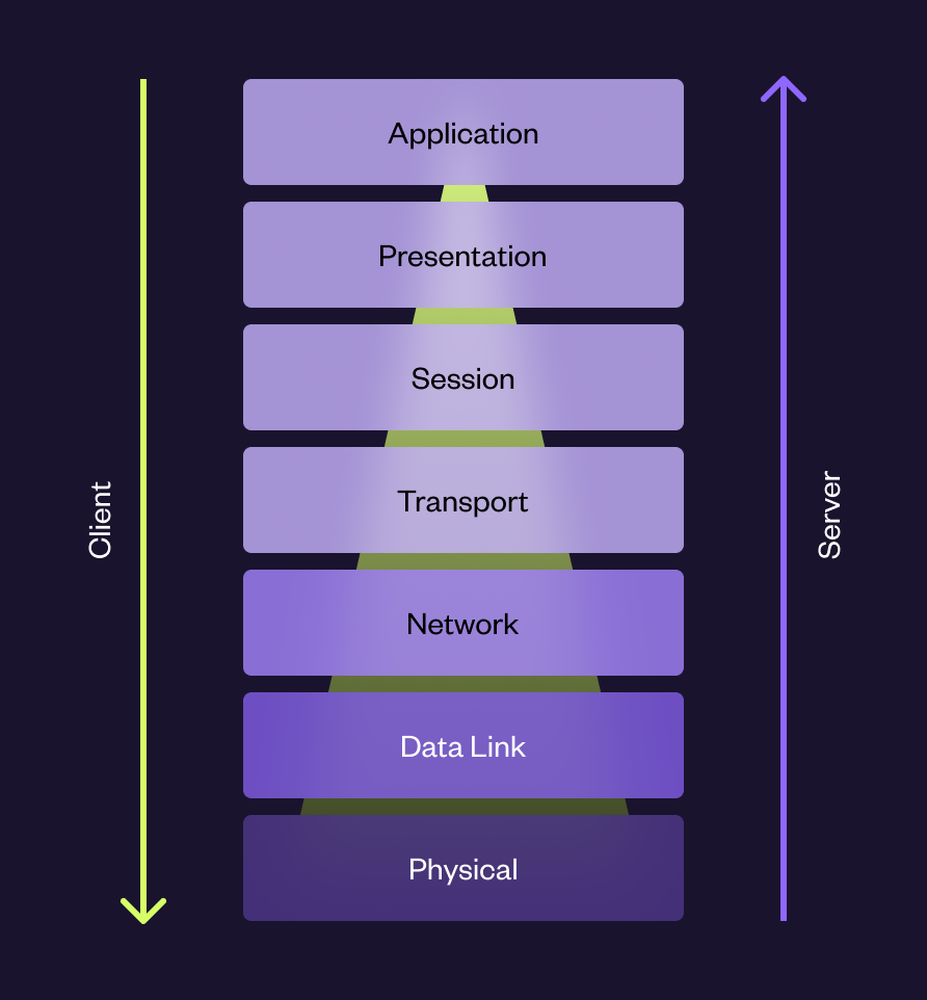
The OSI Model consists of **7 layers**, each responsible for a specific function in network communication.

| Layer                | Function                                                                    |
| -------------------- | --------------------------------------------------------------------------- |
| **7 - Application**  | Where users interact with applications (e.g., web browsers, email clients)  |
| **6 - Presentation** | Converts and formats data for communication (e.g., encryption, compression) |
| **5 - Session**      | Establishes, manages, and terminates communication sessions                 |
| **4 - Transport**    | Ensures reliable or fast delivery of data between devices                   |
| **3 - Network**      | Determines the best path for data to travel through a network               |
| **2 - Data Link**    | Manages direct connections between devices on the same network              |
| **1 - Physical**     | Deals with the hardware that transmits data (e.g., cables, radio signals)   |

<figure><img src="/files/WguaAkUCjxTZ95lJHcTl" alt=""><figcaption><p>Image Adapted from <a href="https://a.storyblok.com/f/223147/892x962/c8c628e2b3/osi-model.png/m/0x1000">https://a.storyblok.com/f/223147/892x962/c8c628e2b3/osi-model.png/m/0x1000</a></p></figcaption></figure>

## About Layers

### **Layer 7 - Application Layer**

This is the layer where **humans interact with software applications** to send and receive data.

**Examples:**

* **Web Browsing (HTTP/HTTPS):** When you type `ncateam.xyz` into a browser, your request is processed at this layer.
* **Email (SMTP, IMAP, POP3):** When sending an email using Gmail or Outlook.
* **File Transfers (FTP):** Downloading or uploading files over the internet.
* **Messaging Apps (WhatsApp, Telegram, Discord):** Sending texts or images over the internet.

<figure><img src="/files/cEqif5ZXE98Ld6bCqsXw" alt=""><figcaption></figcaption></figure>

### **Layer 6 - Presentation Layer**

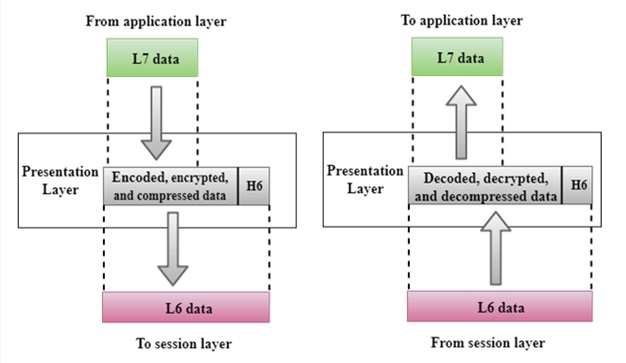
This layer **formats, encrypts, and compresses data** so it can be properly understood by the receiving application.

**Examples:**

* **Encryption (SSL/TLS):** When you visit a secure website (`https://`), your data is encrypted here.
* **Character Encoding (ASCII, Unicode):** Ensuring that text appears correctly in different languages.
* **Data Compression (ZIP, MP3, JPEG):** Compressing files so they use less bandwidth.

<figure><img src="/files/D6cM3ee1thnnsmFdDJ2l" alt=""><figcaption><p>Image Adapted from: <a href="https://www.includehelp.com/computer-networks/images/presentation-layer.jpg">https://www.includehelp.com/computer-networks/images/presentation-layer.jpg</a></p></figcaption></figure>

### **Layer 5 - Session Layer**

This layer is responsible for **establishing, managing, and terminating connections** between two devices.

**Examples:**

* **Online Banking:** When you log into a bank’s website, the session ensures you remain logged in securely.
* **Video Calls (Zoom, Skype):** The session keeps the call active while data is transmitted.
* **Logging into Websites:** When you stay logged into a website without frequent reauthentication.

<figure><img src="/files/I3UNgwo5kEj3uIJW5pzQ" alt=""><figcaption></figcaption></figure>

In the figure above, we can see the request and response arrows, which indicate that session establishment and termination occur only when the sender makes a request and the receiver responds.

Abstractly, we can understand the session layer using the example of websites. When we log in, a cookie acts as a medium that maintains the session between the client and the server. When we log out, the session is terminated. This process follows a request-response mechanism.

### **Layer 4 - Transport Layer**

This layer ensures that data is **delivered completely and in the correct order**.

**Two Main Protocols:**

* **TCP (Transmission Control Protocol):** Ensures reliable, ordered, and error-checked delivery.
  * Example: Watching Netflix (video streams without missing parts), Text Chatting.
* **UDP (User Datagram Protocol):** Faster but does not guarantee delivery.
  * Example: Online gaming (slight data loss doesn’t ruin gameplay) and Live Streaming.

<figure><img src="/files/KEa2E1FjlbLWSUFOzVVD" alt=""><figcaption></figcaption></figure>

In the figure above, we can see both TCP and UDP connections. Let's first discuss TCP.

In a TCP connection, the process begins with the client sending a **SYN** flag (short for Synchronization) to the server, essentially asking, *"Are you alive?"* The server responds with a **SYN-ACK**, where **ACK** (short for Acknowledgment) confirms the receipt of the SYN, and **SYN** indicates that the server is also initiating communication. Finally, the client replies with an **ACK**, confirming the connection. At this point, both the client and the server know that they are ready to communicate, and a session is established. This process is known as the **TCP three-way handshake**.

On the right side of the figure, we see the UDP connection. Here, the server requests data, and the client sends a response. However, unlike TCP, UDP does not establish a handshake or guarantee delivery. The client sends data, but it does not know whether the server has received it or if the data was lost in transit. Similarly, the server does not confirm receipt of the response. This makes UDP faster but less reliable compared to TCP.

{% hint style="danger" %}
To know more about SYN, ACK, etc.. (TCP Flags) we showed in above figure, visit: <https://www.geeksforgeeks.org/tcp-flags/>
{% endhint %}

### **Layer 3 - Network Layer**

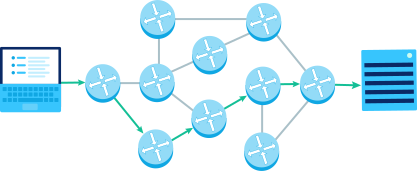
This layer decides the **best route for data packets to take** from source to destination.

**Examples:**

* **IP Addresses (IPv4 & IPv6):** Every device on a network has an IP address for identification.
* **Routers:** Forward data packets between different networks.
* **Google Maps (Pathfinding Analogy):** Like GPS finds the best route, the Network Layer finds the best data path.

<figure><img src="/files/8nfxJwt4Tl2q4SEEm3Fw" alt=""><figcaption><p>Image Adapted from <a href="https://cdn.kastatic.org/ka-perseus-images/0d415093c4d2160530541f0170204200c89111d3.svg">https://cdn.kastatic.org/ka-perseus-images/0d415093c4d2160530541f0170204200c89111d3.svg</a></p></figcaption></figure>

In the image above, we can see both the client and the server, with multiple routers in between. Notice the numbered path highlighted in a red-orange color? That represents the shortest path from the client to the server, as determined by routing at the **network layer**.

### **Layer 2 - Data Link Layer**

This layer ensures **data is transferred correctly between two directly connected devices**. This layer is responsible for communication between **directly connected** network devices (e.g., client and router, or router to another router). It deals with **MAC addresses**, **frames**, and **error detection**. Protocols like **Ethernet, Wi-Fi (802.11), and PPP** operate at this layer.

**Examples:**

* **Ethernet (Wired Networks):** Used in LAN (Local Area Network) setups in homes and offices.
* **Wi-Fi (Wireless Networks):** Connects laptops and phones to a router wirelessly.
* **MAC Addresses:** Unique addresses assigned to network interfaces.

{% hint style="info" %}
It consists of two sub-layers: the **Logical Link Control (LLC)**, which deals with communication management, and the **Media Access Control (MAC)**, which controls access to the shared network medium.

The **MAC (Media Access Control)** sub-layer plays a critical role in identifying devices using unique **MAC addresses** and managing how data is transmitted on a shared medium like Ethernet or Wi-Fi. It uses **MAC addresses** to ensure that frames are sent to the correct device and prevents data collisions in networks where multiple devices share the same medium. For example, in Ethernet, **CSMA/CD (Carrier Sense Multiple Access with Collision Detection)** is used to avoid simultaneous transmissions, while in Wi-Fi, **CSMA/CA (Carrier Sense Multiple Access with Collision Avoidance)** is employed to prevent interference. The MAC layer essentially ensures smooth and organized communication within a local network.
{% endhint %}

<figure><img src="/files/sYBmWw8njjx5YxwyTXYq" alt=""><figcaption></figcaption></figure>

### Layer 1 - Physical Layer

#### **Layer 1 - Physical Layer**

This is the **hardware layer**, where actual physical connections exist. This is the **actual physical medium** that transmits raw bits of data. It includes **Ethernet cables, fiber optics, radio waves (Wi-Fi), and even electrical signals** in copper wires.

**Examples:**

* **Ethernet Cables (Copper & Fiber Optics):** Used to connect computers to networks.
* **Wi-Fi Signals:** Transmit data wirelessly via *radio waves*.
* **Bluetooth:** Uses radio frequencies to connect wireless devices like keyboards and headphones.

#### Radio Waves

<figure><img src="/files/8u3nyYeRobUFsdbJCKv5" alt=""><figcaption></figcaption></figure>

#### Ethernet Cable

<figure><img src="/files/uRmfoYBbX5GHsxn1xePB" alt="" width="360"><figcaption></figcaption></figure>


---

# Agent Instructions: Querying This Documentation

If you need additional information that is not directly available in this page, you can query the documentation dynamically by asking a question.

Perform an HTTP GET request on the current page URL with the `ask` query parameter:

```
GET https://handbook.ncateam.xyz/fundamentals/networking/networking-models/osi-model.md?ask=<question>
```

The question should be specific, self-contained, and written in natural language.
The response will contain a direct answer to the question and relevant excerpts and sources from the documentation.

Use this mechanism when the answer is not explicitly present in the current page, you need clarification or additional context, or you want to retrieve related documentation sections.